Introducing the Channels SDK webinar
Your users already work in Slack and Microsoft Teams. Getting an agent into those channels usually means a separate integration for each one, with its own provider setup, message format, and delivery rules.
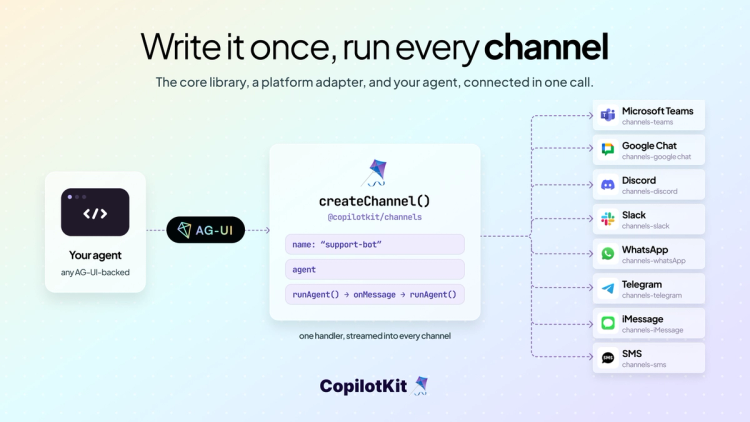
Today we're releasing the Channels SDK, an open source library that brings any AG-UI agent to channels like Slack, Microsoft Teams, and other chat platforms. Your agent lives right there, with the same memory and context the people in the thread already have.
Slack and Teams are managed for you today, with CopilotKit Intelligence handling the platform side, credentials, delivery, and ordering, and more channels coming soon.
npx copilotkit@latest channels setupWe have created public channels on Slack and Microsoft Teams so you can try the agent live. Head to copilotkit.ai/try-channels and we'll get you in.
To get started, clone OpenTag on GitHub for a complete working example, or follow the quickstart guide in the Channels docs.
Add a channel in the dashboard, connect Slack or Teams, and point your runtime at your agent. To add another platform later, connect it in the dashboard and the rest of your code stays the same.
import { createChannel } from "@copilotkit/channels";
import { CopilotRuntime, CopilotKitIntelligence } from "@copilotkit/runtime/v2";
import { createCopilotNodeListener } from "@copilotkit/runtime/v2/node";
import { agent } from "./agent"; // any AG-UI or CopilotKit agent

const channel = createChannel({ name: "support-bot", identifyUser: "platform", agent });

channel.onMessage(({ thread, message }) => thread.runAgent({ prompt: message.text }));

const runtime = new CopilotRuntime({
  agents: {},
  intelligence: new CopilotKitIntelligence({
    apiKey: process.env.INTELLIGENCE_API_KEY!, // free to start
  }),
  channels: [channel],
});

await createCopilotNodeListener({ runtime }).channels?.ready();
The agent's reply streams into the channel and updates in place as the agent writes. The same handler works in every channel. For the full setup, env, JSX config, and run steps, read the quickstart guide.
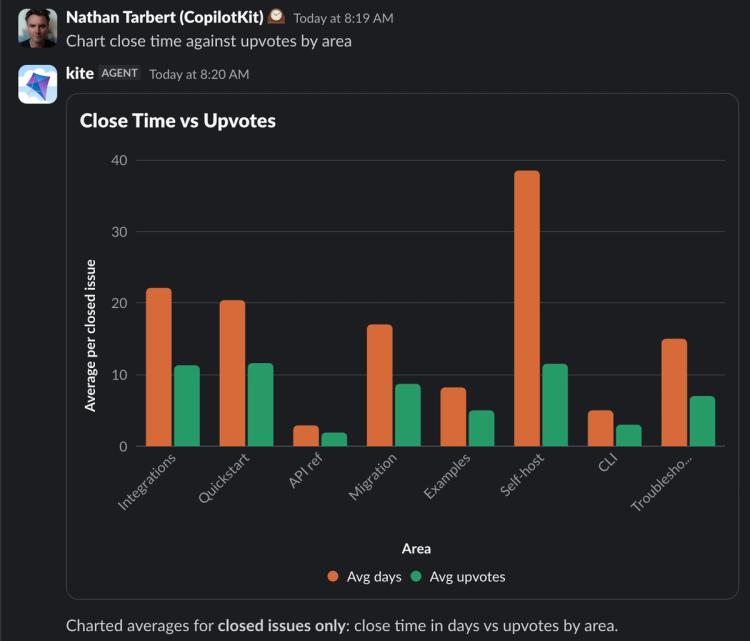
The agent's replies render as each platform's own UI, Block Kit in Slack and Adaptive Cards in Teams, from a single message you write once in JSX.
You compose a rich reply from the Channels component library: sections, headers, buttons, tables, and more, and the pieces you write become native components on each platform.
import { Message, Section, Actions, Button } from "@copilotkit/channels/ui";

await thread.post(
  <Message>
    <Section>Deploy v1.4.2 to production?</Section>
    <Actions>
      <Button onClick={({ thread }) => thread.post("Shipping.")}>Ship it</Button>
      <Button>Cancel</Button>
    </Actions>
  </Message>,
);
Your agent also gets all of these out of the box:
/commands and react-to-any-message handlersHere's Generative UI live in slack.
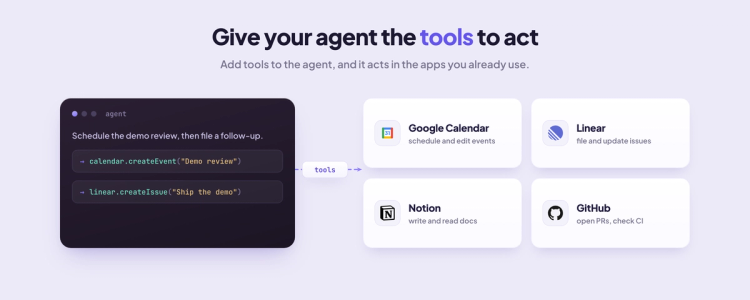
A tool lets the agent do more than answer, it calls your code to open a PR, file an issue, or trigger a deploy, then posts the result back into the thread. You define a tool.
For example, someone reports a bug in the channel. You ask the agent to file a Linear issue and draft a PR against it, and post both back to the thread. Your code runs each action, and anything that ships waits for your approval.
import { defineChannelTool } from "@copilotkit/channels";
import { z } from "zod";

// The Linear issue step from the bug flow above. You'd define open_pr the same way.
const createLinearIssue = defineChannelTool({
  name: "create_linear_issue",
  description: "Create a Linear issue from a reported bug",
  parameters: z.object({ title: z.string(), body: z.string() }),
  async handler({ title, body }) {
    const url = await createIssue({ title, body }); // your code
    return `Created a Linear issue: ${url}`;
  },
});

// createChannel({ name, agent, tools: [createLinearIssue] })
Already have tools in an MCP server? Connect it and the agent gets those alongside the ones you define. See Tools and context docs.
The agent remembers in two ways. Conversation history is it recalling the current thread, and it works out of the box, Intelligence handles it, you store nothing. Transcripts add memory across platforms, so someone who asked in Teams can follow up in Slack with the earlier conversation already in context.
Transcripts live in the store you pass to createChannel. In development that store stays in memory and resets on restart. For production, plug in a durable store (Redis, Postgres) so transcripts and pending approvals survive a restart.
createChannel({
  name: "support-bot",
  identifyUser: ({ actor }) =>
    actor.email ? { id: actor.email, name: actor.name ?? actor.email } : null,
  agent,
  store: {
    adapter: new MyStore(),             // Redis, Postgres
    transcripts: { retention: "30d" },  // memory that follows the user
  },
});The Channels SDK is open source, and every channel runs on a CopilotKit Intelligence key. Your agent runs in your own infrastructure, connected over AG-UI, and Intelligence sits between it and the platforms.
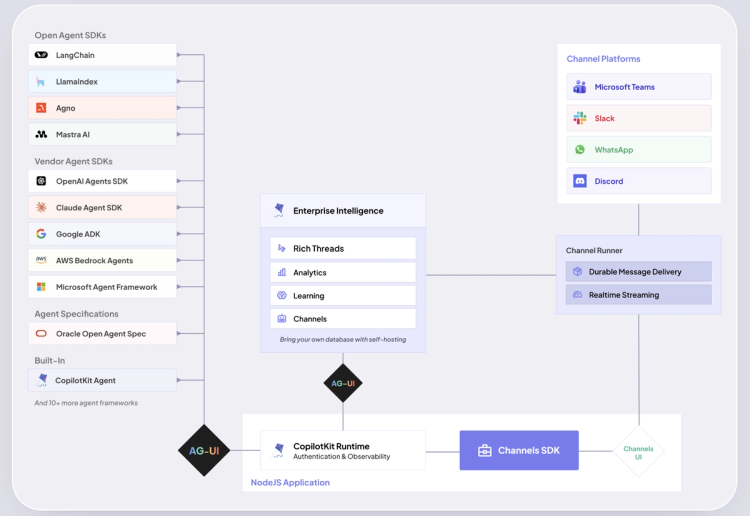
Getting an agent into your channels yourself means owning everything on the platform side:
To run your agents in production, we give you managed Slack and Microsoft Teams today with CopilotKit Intelligence. It holds the credentials, receives each event, and delivers the turn to your bot over a persistent connection, keeping delivery ordered and de-duplicated, so your process just runs the agent. Adding another platform is a click in the dashboard.
Talk to our engineers and we'll get you set up.
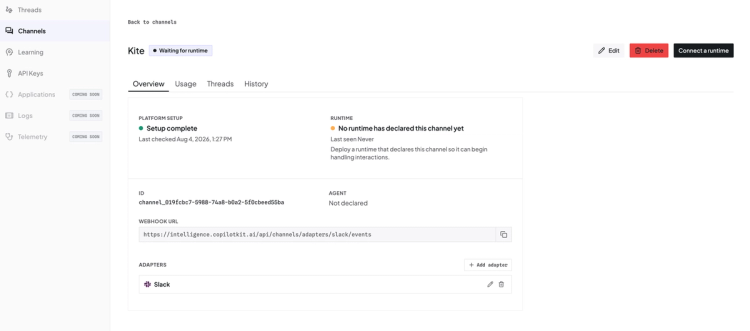
The Channels SDK is open source and launches with Slack and Microsoft Teams, both fully managed through Intelligence.
Get started by creating a free Intelligence key and connecting your first channel.
The work already happens in Slack and Teams. The Channels SDK puts the agent right in the thread, with the tools and context already there.
Talk to our engineers and we will help you set up.
Follow CopilotKit on Twitter. If you get stuck, reach out in the CopilotKit or AG-UI communities.
Subscribe to our blog and get updates on CopilotKit in your inbox.