Eyebrow Background Glow

MCP Apps: Bring MCP Apps to your users!

How Microsoft Agent Framework + AG-UI Enable Agentic UX & Generative UI

By Nathan Tarbert
November 20, 2025

Building with the Microsoft Agent Framework + AG-UI, now in Python!

Microsoft’s Agent Framework (MAF) is an open-source agent framework that has recently emerged, offering exceptional ways to build agents and multi-step workflows in .NET or Python. Paired with AG-UI, the frontend/runtime layer that enables those agents to appear in your app with a clean UI, streaming responses, and shared state, etc., delivers a seamless agentic experience.

The integration between the two is simple but powerful: MAF handles the reasoning and tool-use, and AG-UI bridges the interactions between the agent and the users.

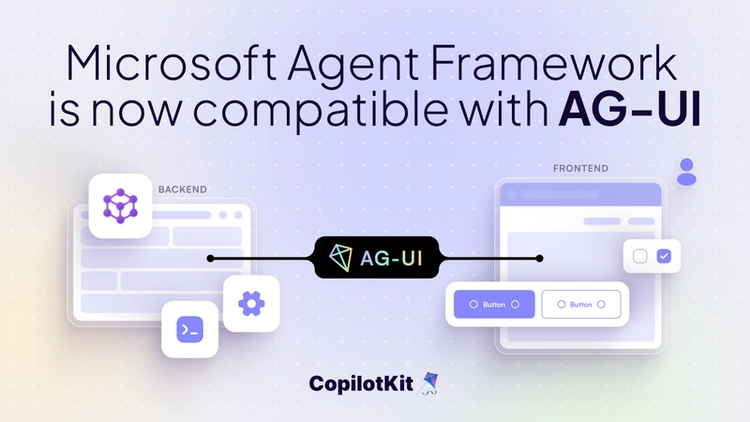
Microsoft Agent Framework (MAF) and AG-UI together offer a clean separation:
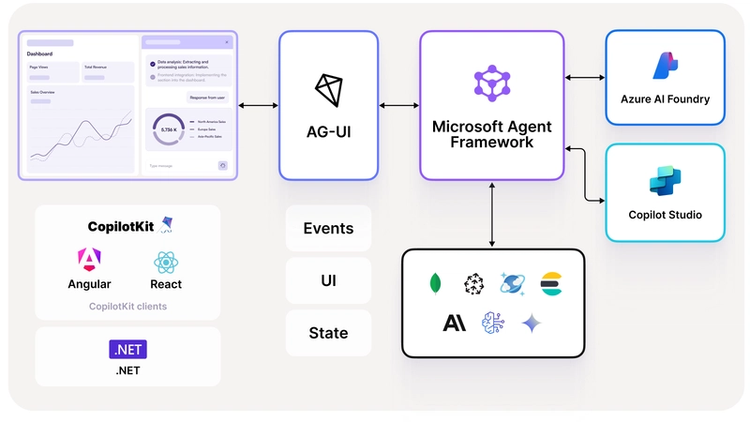
  • MAF handles the agent’s intelligence, workflows, memory, and tool use.
  • AG-UI is the open protocol that standardizes how agents communicate with user interfaces.
__wf_reserved_inherit

Once an agent speaks AG-UI, it becomes immediately compatible with any AG-UI-aware frontend, including Microsoft’s own Blazor client and CopilotKit.

This combination is what turns MAF agents from “backend processes” into interactive, stateful, user-facing agents.

What the Microsoft Agent Framework Provides

MAF provides the core building blocks:

  • Agents that call models, use tools, and keep state across turns.
  • Workflows for multi-step or multi-agent processes.
  • Model and memory providers so your agents can store data or thread context.

Check out MAF GitHub ⭐️

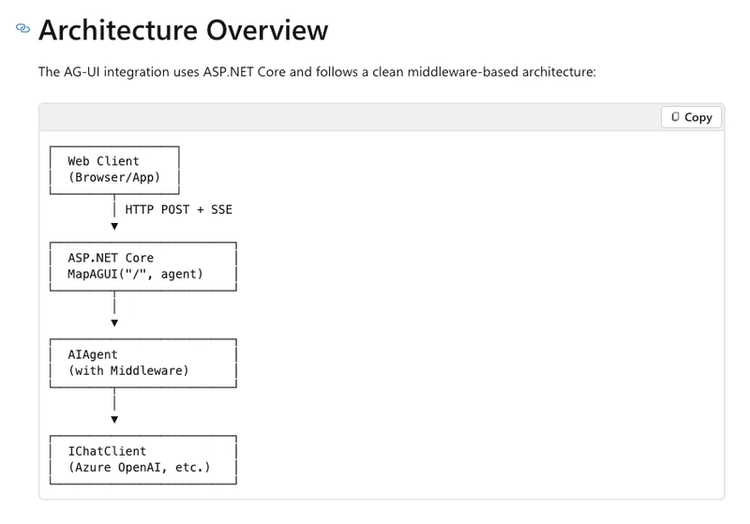
It’s practical if you want to move past “chat completion” and give the model structure, state, and the ability to act.
__wf_reserved_inherit

What AG-UI Adds to the Picture

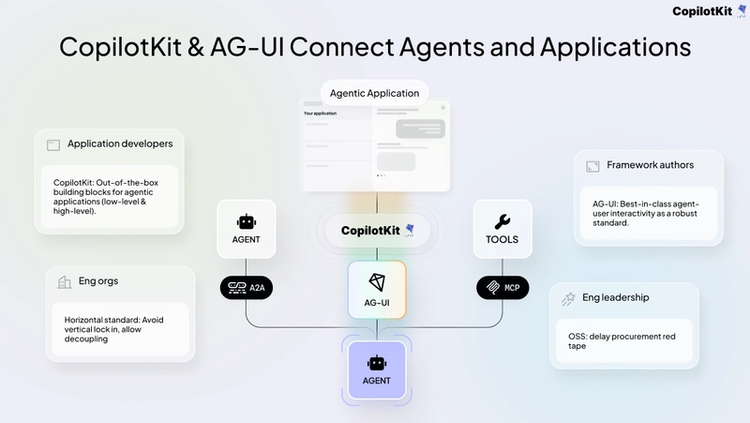
AG-UI is the open protocol that defines how an agent communicates with a user interface.
__wf_reserved_inherit

It standardizes things like:

  • Streaming messages
  • State updates
  • Tool invocations
  • UI events
  • Multi-agent routing
  • Interruptions / tool-progress events
  • Frontend → agent actions

This removes the need to design your own transport, your own formatting, your own event system, or your own UI message schema.

Instead of every framework inventing its own UI contract, AG-UI is the shared layer they converge on.

Check out AG-UI's GitHub ⭐️

Microsoft Agent Framework + AG-UI

1. MAF agents become UI-ready out of the box

  • No additional custom wiring.
  • No custom WebSockets.
  • No bespoke JSON formats.

The agent speaks AG-UI, which removes any additional complexities.

2. Multi-step workflows can surface naturally in UI

Because AG-UI supports state sync and streaming, a MAF workflow can show:

  • intermediate states
  • partial outputs
  • tool progress
  • agent-to-agent handoffs
  • moments where the agent needs user input

This is critical for user trust and usability.

3. Typed state becomes visible to the user

MAF agents often maintain a structured state (objects, lists, workflow context).

AG-UI transports this state to the frontend, where it can drive live UI components.

4. Use of tools

AG-UI can show:

  • When a tool was invoked
  • What parameters were used
  • What the tool returned

This is a major improvement over hidden function-calling flows.

5. Use any AG-UI-compatible frontend

Once your MAF agent speaks AG-UI, you can plug it into:

  • CopilotKit
  • Microsoft Blazor
  • Terminal Client
  • Kotlin SDK (mobile, JVM)

This gives the agent a portable, future-proof interface layer.
Why This Matters for Developers

__wf_reserved_inherit

A complete agent loop

Agent → protocol → frontend → user → agent

No custom engineering required.

A more interpretable agent

With streaming, intermediate states, and exposed tool use, you can debug and trust the agent in a way plain chat completions don’t allow.

This allows a path to build real applications

  • SaaS copilots
  • Co-creation copilots
  • automation agents

All while retaining clear structure and maintainability.

Additionally, the developer doesn't need to reinvent the wheel.

--> MAF handles reasoning + tools.

--> AG-UI handles communication + events.

--> The user is now able to collaborate with the agent in real time.

The stack is clean.

Summary

Microsoft Agent Framework gives you an agent with: tools, workflows, state, orchestration, and model thinking.

AG-UI gives that agent a standardized way to interact with the user, whether on mobile or desktop.

Together, they let you build agents that aren’t constrained to the backend, but usable, visible, and connected to real applications.

To stay up to date, please follow CopilotKit on Twitter and join the Discord community.
Top posts

See All
Reusable Agents Meet Generative UIs
Anmol Baranwal and Nathan TarbertMarch 12, 2026
Reusable Agents Meet Generative UIsOracle, Google, and CopilotKit have jointly released an integration that standardizes how AI agents are defined, how they communicate with frontends in real time, and how they describe the UI they require. The integration connects three distinct layers. Oracle's Open Agent Specification (Agent Spec) provides a framework-agnostic way to define agent logic, workflows, and tool usage once and run it across compatible runtimes. AG-UI handles the live interaction stream between the agent and the frontend, keeping tool progress, state updates, and user interactions synchronized while the agent is executing. A2UI, developed by Google, allows agents to describe the UI they need - forms, tables, multi-step flows - as structured JSONL, which CopilotKit then renders automatically inside the host application. Previously, each of these layers required custom implementation per project. This release establishes a shared contract across all three, meaning agent developers can define the agent once, expose a standardized interaction stream, and have the frontend render structured UI surfaces without writing custom wiring for each tool or workflow. The practical impact is reduced integration friction across the ecosystem - agent runtimes and frontend clients that implement these standards can interoperate without lock-in to a specific framework or vendor.
The Developer's Guide to Generative UI in 2026
Anmol Baranwal and Nathan TarbertJanuary 29, 2026
The Developer's Guide to Generative UI in 2026AI agents have become much better at reasoning and planning. The UI layer has mostly stayed the same, and it is holding back the experience. Most agent experiences still rely on chat, even when the task clearly needs forms, previews, controls, or step-by-step feedback. Generative UI is the idea that allows agents to influence the interface at runtime, so the UI can change as context changes. This is usually done through UI specs like A2UI, Open-JSON-UI, or MCP Apps. We'll break down Generative UI, the three practical patterns, and how CopilotKit supports them (using AG-UI protocol under the hood).
Bring MCP Apps into your OWN app with CopilotKit & AG-UI
Anmol Baranwal and Nathan TarbertJanuary 22, 2026
Bring MCP Apps into your OWN app with CopilotKit & AG-UIToday, we are excited to announce CopilotKit’s support for MCP Apps. Now, MCP servers can finally ship an interactive UI that works out of the box in real agent applications.
Are you ready?

Stay in the know

Subscribe to our blog and get updates on CopilotKit in your inbox.